
To the customer
Hungry again? Noor Cafe & Bakery is cooking.
Order in a couple of taps: noor-cafe.getmenu.ae. Use code COMEBACK10 for a discount.
GetMenu is restaurant marketing software that messages your customers when it is time for their next meal. After each delivered order, a WhatsApp reminder goes at the time of day that customer usually orders. GetMenu also writes to customers who have stopped ordering, reminds regulars who have gone quiet, and offers a loyalty card in Apple Wallet and Google Wallet.
A customer orders from you, enjoys the meal and means to come back. A day or a week later they are hungry again, and they order from whichever place they think of first. Often that is not you, even though nothing went wrong.
A short message at the right time brings customers back. It can go at their next mealtime, when a regular is later than usual, or a month after someone's last order. But nobody has time to send these by hand. The person on WhatsApp is busy with today's orders, and nobody keeps a list of who ordered when.
So most restaurants send nothing, or send one offer to everyone at once. Saying nothing lets customers slowly forget you. One message to everyone also reaches people who ordered an hour ago, and too many messages can get a WhatsApp number reported.
After a delivered order, GetMenu sends the customer a WhatsApp reminder at their usual mealtime. It says your restaurant is cooking and links straight back to your ordering page, so the next order takes a couple of taps.
GetMenu looks at the time of day each customer usually orders. A lunch customer hears from you at lunchtime, and a dinner customer at dinner time. The reminder waits at least 20 hours after a delivery, then goes at the customer's usual mealtime. You can set the wait from 1 to 720 hours. You can add a coupon code too, and the message asks the customer to use it.
The mealtime reminder comes with every plan, is on from the start, and goes from your own WhatsApp number. Each delivered order brings one reminder, never two. Orders from your ordering page count, and so do phone and WhatsApp chat orders typed in at the POS. The message is already written for you. You choose the wait and the coupon code.
The review request, set up on the same page as this reminder
Hungry again? Noor Cafe & Bakery is cooking.
Order in a couple of taps: noor-cafe.getmenu.ae. Use code COMEBACK10 for a discount.
Sent at the customer's usual mealtime. You choose the wait after delivery and the code.
Switch on win-back messages. This is a set of three messages that GetMenu sends to customers who have not ordered for a while. They go 14, 30 and 60 days after the last order, and you can change the days. Each one can carry its own coupon code.
A customer never gets all three at once. Someone who has been away for 70 days when you switch it on gets only the 60-day message. The moment they order again, the three steps start over for them.
Each message comes ready-written, and you can change the words. The customer's name and your restaurant's name are filled in, and the link to your ordering page is added for you. The first message usually carries no discount, because a reminder costs less than a coupon. A separate message can go to people who ordered once and never came back. Both are off until you switch them on.
Step by step: set up win-back messages and the quiet-regular message
Win-back messages
The quiet-regular message checks how often each regular customer orders. It sends a short reminder when a customer has gone longer than usual without ordering. Someone who orders every six days and has gone twelve days without an order hears from you. A customer who orders once a month is left to the win-back messages.
It only looks at customers with at least four orders. It sends its message before the first win-back message is due. You decide when a customer counts as late. The default is twice their usual time between orders. You also decide how often one customer may get this message. The default is once in 90 days.
Some customers order on the same weekday again and again. GetMenu sends them the usual-day message on that weekday. You pick the hour. Noon is the default. Messages only go between 10:00 and 21:00 in your restaurant's time, so an earlier hour waits until 10:00. It goes at most once a week. Both messages are off until you switch them on.
A campaign is one message you write and send to a group of your own customers. You choose the group from your order history. You can pick everyone who has ordered, first-time customers or top spenders. You can also pick people who ordered several times lately, people who have not ordered for some days, or people close to a loyalty reward.
Ten ready-made messages help you start, for times like Ramadan, Eid, payday and match nights. Each has blanks in square brackets for your own details, and the campaign screen will not send it while one is still empty.
The campaign goes from your own WhatsApp number, one message at a time with a pause between them, never all at once. You set a daily limit. It is 30 unless you change it, and the highest you can set is 500. Messages over the limit go out the next day, starting at 11 in the morning. You can send the campaign on WhatsApp, as a short note on your customers' wallet cards, or on both.
GetMenu's automatic promotions follow a weekly limit per customer: 2 messages in 7 days unless you change it. A message over the limit is not lost. It waits in the Review queue until you approve it or discard it.
The limit covers automatic promotions, such as win-backs, quiet-regular messages, the usual-day message and abandoned-cart reminders. If two promotions would reach the same customer in one week, the second one waits for your approval. Automatic promotions only go out between 10:00 and 21:00, in your restaurant's time zone. You can set the limit from 0 to 14. At 0, every automatic promotion waits for your yes.
Campaigns you write yourself follow their own daily limit and spacing instead. The mealtime reminder and the review request go once for each delivered order, with their own settings. Messages on the wallet card are not counted. Google allows three notifications per card a day.
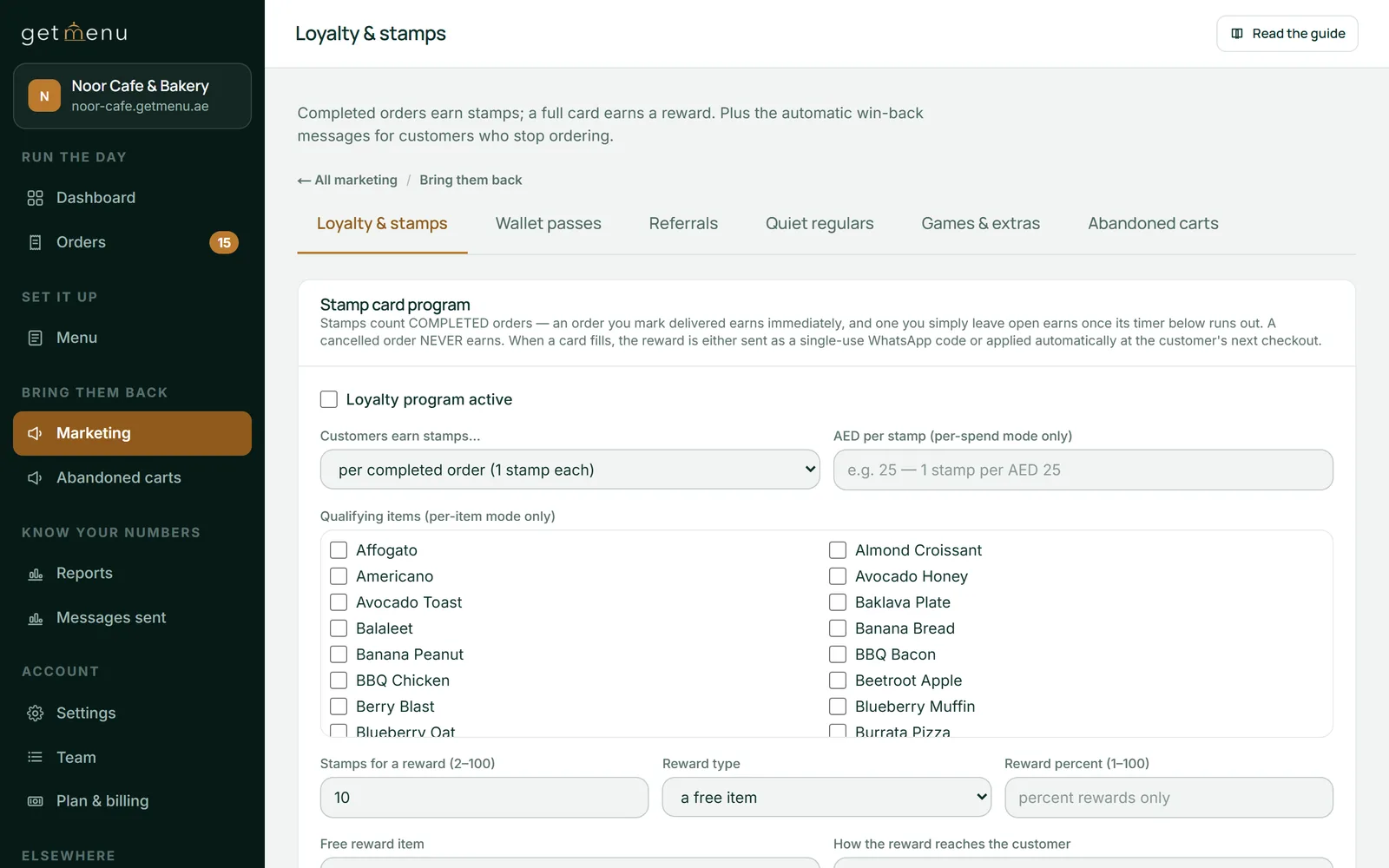
Customers earn loyalty stamps without anyone pressing a button. A stamp is added when the order is complete. That is when someone marks it delivered, or when the automatic timer ends if nobody does.
Stamps can be earned per order, per amount spent, or per chosen dish. The per-dish choice helps you sell more of that dish. You also set how many stamps make a reward, and whether it is a free item or a percentage off. The reward goes as a single-use code on WhatsApp, or it comes off the customer's next online order by itself. Cancelled orders never earn. A sale at the counter earns a stamp too when the cashier adds the customer's phone number.
You can also add three levels on top of the stamp card, with names you choose. A level can give a percentage off every online order, with no code to type. If the customer also enters a coupon, they get the better of the two, never both.
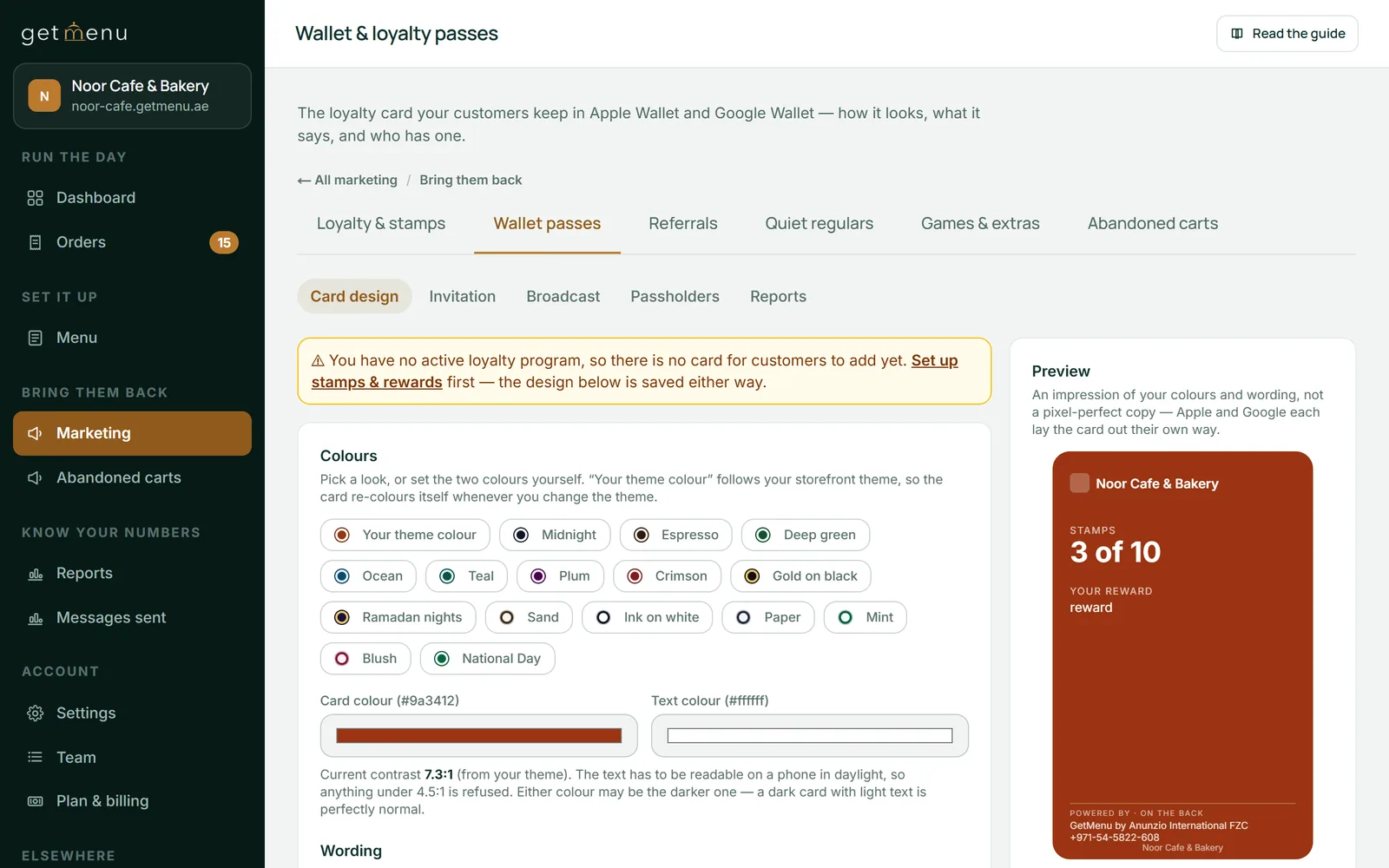
Your customers keep your loyalty card in Apple Wallet or Google Wallet, on the phone they already carry. Nothing needs to be downloaded, and the card updates itself after every stamp.
After ordering, the customer sees an Add to Wallet button on their order page, and one tap saves the card. After a customer's first order, GetMenu can also send one WhatsApp message saying the card exists, 4 hours later unless you change the wait. You can give bonus stamps for adding the card, once per customer.
You design the card: colours from ready-made looks, three stamp designs and your own header line, checked so the words stay readable. Changes reach the cards customers already hold. You can send a short offer to your customers' wallet cards. It goes to up to 500 cards, once a day. It can show as a notification on the phone. The card holds no name and no phone number.
Make sure Re-order nudge is ticked, type the wait in hours after a delivery if 20 does not suit you, and add a coupon code if you want one.
Settings, then Automations
Tick Run the win-back ladder, then set the days, the message and an optional coupon code for each of the three stages.
Marketing, then Loyalty & stamps
Switch on Quiet regulars and the usual-day message, and pick the hour the usual-day message goes out.
Marketing, then Quiet regulars, and Weather & timing triggers
Type how many automatic promotions one customer may get in a week, then approve or discard what is waiting.
Marketing, then Review queue & weekly cap
Choose how stamps are earned and the reward, tick Loyalty program active, then design the card your customers will save.
Marketing, then Loyalty & stamps, and Wallet passes
From their own orders. GetMenu checks what time each customer ordered before. It sees if they order at breakfast, lunch or dinner, and sends the reminder at that time. It also learns how often a regular orders, in days, and on which weekday. There is nothing to type in. You choose the wait after a delivery and the hour of the usual-day message.
Yes, for the win-back messages, the quiet-regular reminder and the usual-day message. Each comes with ready-written words you can change, and GetMenu fills in the customer's name and your restaurant's name. The mealtime reminder's words are fixed: it says your restaurant is cooking and links to your ordering page. For that one, you set the wait after delivery and whether it carries a coupon code.
Yes. When someone types their name and number at checkout and leaves without ordering, GetMenu prepares a reminder after the wait you choose. If that number has written to your restaurant on WhatsApp before, the reminder is sent like your other automatic promotions. If not, it waits for your approval. It is never sent if they ordered in the meantime, and the cart details are kept for three days at most.
Yes, with referrals. Every customer gets their own link to share. When a friend they invited has their first order delivered, both of them get a coupon. The reward waits for a delivered order, so a fake invitation earns nothing, and a cancelled first order pays nothing. Referrals are off until you switch them on, on the Growth and Pro plans.
The mealtime reminder comes with every plan. Campaigns, quiet-regular messages, the usual-day message, referrals, abandoned-cart reminders and the weekly limit screen are on the Growth and Pro plans. Stamp cards, loyalty levels, the win-back ladder and the wallet card are on Pro. Every account starts with 15 days free and no card, and the pricing page shows each plan in your own currency.
Yes, for mealtime reminders and automatic promotions such as win-backs. Connect a spare Android phone with a SIM card. For each kind of message, choose one: off, only if WhatsApp fails, or always as well as WhatsApp. Promotion texts follow the same weekly limit and hours as WhatsApp promotions. Campaigns you write go on WhatsApp and the wallet card. Your mobile operator charges for the texts.
It keeps the customer records a restaurant needs, inside your orders. GetMenu saves each customer's number and order history from their orders. It uses this to choose who gets which message. The groups are regulars, people who have gone quiet, first-time customers and top spenders. There is no customer list to import and nothing to keep up to date by hand. It is built for bringing customers back, not for managing sales deals.
Try GetMenu free for 15 days, with no card needed. Connect your WhatsApp number, and every delivered order brings the customer a reminder at their next mealtime.