Good hardware with payments built in is both the appeal and the catch. What Clover does well, what the app market and the processor cost you, and why delivery kitchens tend to look elsewhere.
Anzul Aqeel · Founder & Director, Anunzio International FZC · 6 October 2026 · updated 16 October 2026
Clover restaurant POS is good counter hardware with card payments built in. Online ordering carries no commission, but the devices are tied to the card processor that set them up, and loyalty is a paid app. For a cafe or a bar led by the counter, Clover fits well. If most of your orders go out with your own riders, a system built around delivery fits better.
What Clover restaurant POS does well
Start with what the reviewers agree on. Business.com rates Clover its best all-in-one POS system, for payments, ordering and customer tools that work together. It also notes that Clover charges no setup fee and no commission for online orders. So a restaurant can run its own page for pickup and delivery without a separate ordering vendor, and for couriers Clover integrates with DoorDash.
Clover POS for restaurants comes as Dining plans, not a generic shop setup. Buying a Clover POS system for restaurant service means picking one of those plans. The Clover Dining POS plans add a floor plan, table management and bar tabs, so Clover POS for bars is the same software with the right mode switched on.
Clover's own developer page lists the markets it sells in: the United States, Canada, Argentina, Brazil, Mexico, Australia, Singapore, the United Kingdom, Ireland, Austria, Germany and the Netherlands.
The catch: card processing, hardware and the app market
Clover belongs to Fiserv, which acquired it inside the $22 billion First Data deal in 2019. The hardware comes tied to a card processor: Fiserv's own, or the processor that sold it. That is not hidden, but it has three costs a restaurant should plan for.
NerdWallet's review praises the variety of hardware. It also warns that promotions need a three-year contract, that switching processors means buying new hardware, and that a third-party app for advanced reporting will likely cost extra.
Clover restaurant POS pricing
Tech.co's breakdown puts the restaurant software at $89.95 a month for Full-Service Dining Starter, $109.90 for Standard and $129.85 for Advanced, with hardware bundles at $1,799, $2,548 and $4,447 to match. Add the processing on every card and the apps you need, and you have the real monthly figure. The reseller's contract sets how long you are tied in. It is a fair price for a well-made counter with payments inside. It is not a flat price, and it grows with your sales.
GetMenu works differently. The plan is a flat monthly price in your currency, shown on the pricing page, with no commission on orders and no payment processing. The system takes no online payment: customers pay cash or on your own bank's card machine, at the counter and at the door. The ordering page, the WhatsApp messages and stock are in every plan, and invoices are in every monthly plan. Coupons and bundles come with Growth and Pro, and loyalty, tiers and the wallet card come with Pro, as part of the price rather than as separate apps. The POS is a yearly add-on with no trial of its own. The plan's trial runs 15 days with no card.
Why delivery kitchens look elsewhere
Delivery kitchens look elsewhere because Clover is built around the counter and the card payment, not the trip from the customer's phone to your rider. On GetMenu the customer orders on your own page, picks the building and unit number at checkout and can share a map pin.
The moment a delivery order is placed, WhatsApp carries three messages from your own number: the customer's confirmation, the managers' ticket and the riders' dispatch. Riders see where the door is (building, unit and pin), whom to call, and whether the customer pays cash or by card machine, then mark the order delivered from a single link. Phone orders typed in at the counter go to the riders the same way, and the cashier sends delivery orders to a rider on WhatsApp from the POS. GetMenu books no outside couriers; your riders are your own.
The counter still exists, on devices you already own. The POS app runs on iPad, iPhone and Android, pairs with a six-character code from your dashboard and gives each staff member a four-digit PIN. Online and WhatsApp orders show on the POS screen beside counter sales. Every order prints on one kitchen ticket at each station: counter, web and WhatsApp. A customer's note prints on the ticket too, and an allergy note prints in bold red above the dishes. The app prints to ESC/POS printers over USB (on the LAN), network, Bluetooth and built-in, and the cash drawer opens through the receipt printer. Our guide to POS with online ordering shows each screen.
Upload the whole menu from a spreadsheet instead of typing it. There is one stock list for the counter and the online menu, so counts fall as orders come in from the page, the tables and the counter. Tap None left on the POS, and the dish shows as sold out on the other POS devices and on the online menu at once. On the Growth and Pro plans, a guest at a table scans a QR code and orders with no address, because the table is the address. Regulars grow into tiers with their own discounts, and the loyalty card keeps updating itself in Apple Wallet or Google Wallet. Loyalty, tiers and the wallet card are on the Pro plan.
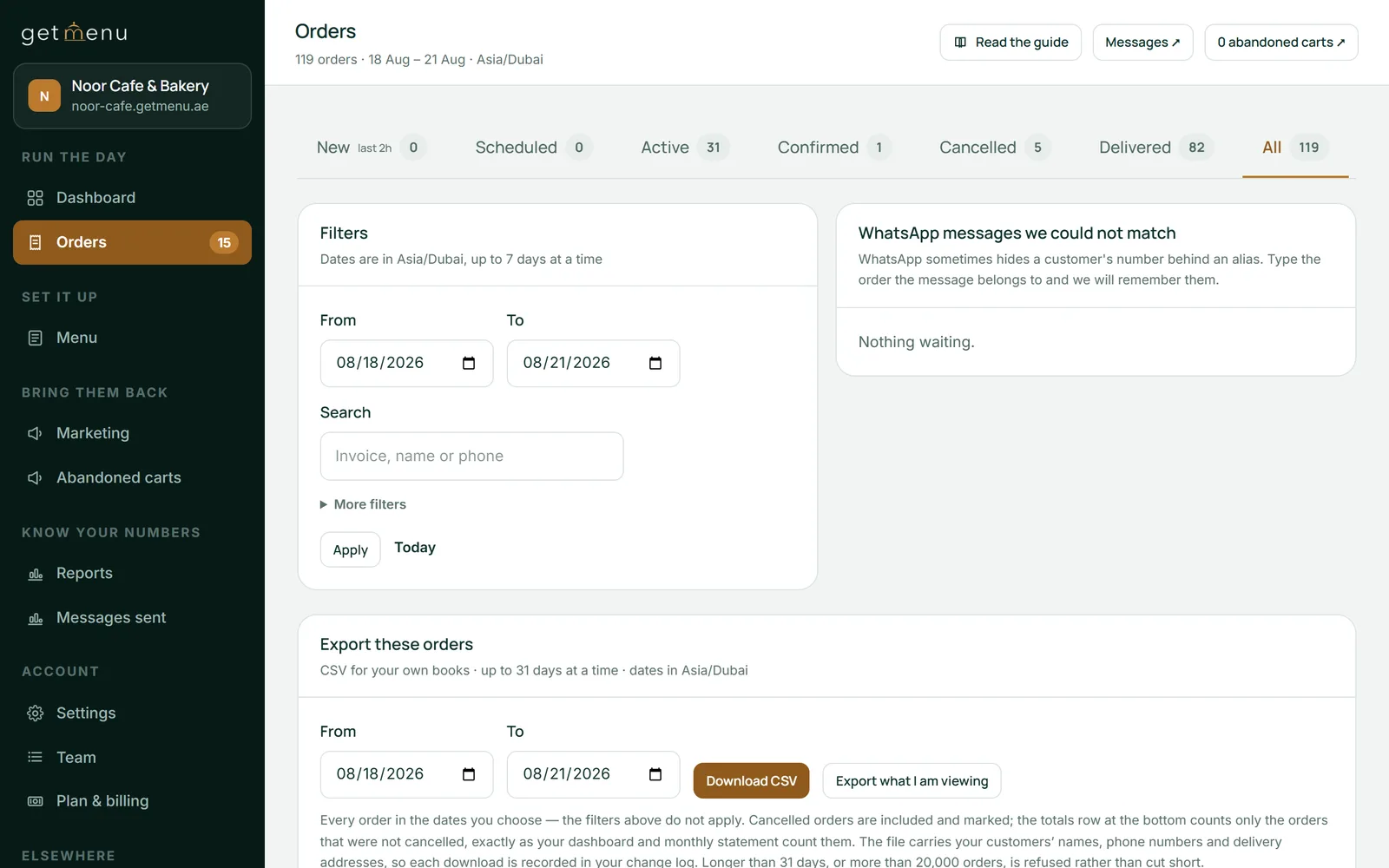
The Orders page in the dashboard: tabs for New, Scheduled, Active, Confirmed, Cancelled, Delivered and All with their counts, date filters and a CSV export
Clover and GetMenu side by side
Clover restaurant POS
GetMenu
Countries
United States, Canada, Argentina, Brazil, Mexico, Australia, Singapore, United Kingdom, Ireland, Austria, Germany, Netherlands
Any country; the restaurant sets its own currency and country
Hardware
Clover's own devices: Station Duo, Mini, Flex, Kiosk
The POS app on iPad, iPhone and Android you own; ESC/POS and Star printers; a spare tablet as the kitchen screen
Card payments
Processing on every card by the processor that sold the hardware; changing processor means new hardware
Your own bank's card machine or cash; no online payment and no processing by GetMenu
Online ordering
Included, no commission
Your own ordering page with its own link, included, no commission
Loyalty and extras
Apps from the App Market, many with a monthly fee
Stamps, tiers and the wallet card on Pro; coupons and bundles on Growth and Pro; none sold as separate apps
Delivery
Through delivery-app integrations such as DoorDash
A WhatsApp dispatch to your own riders with building, unit, pin and a Delivered link
How you pay
Monthly plan plus processing plus apps, often on a reseller contract
A flat monthly plan in your currency, with a 15-day trial and no card; the POS a yearly add-on with no trial
Choose Clover if you are in one of its countries and you want one supplier for the counter and the card payments, with one monthly bill. Choose it if your business is led by the counter: a cafe, a bar, a quick-service line. The range of hardware is wide, the online ordering is a real inclusion, and a reseller who answers the phone is worth a great deal. Price the apps you will need and the processing on a normal month before you sign, and read the contract term twice.
Choose something else if your week is mostly orders that arrive from a link and leave with your own riders. Choose something else if you want to be free to change your card processor later, or if you would rather loyalty and messages were part of the price.
Anzul Aqeel spent four years reselling POS software to small businesses before he built GetMenu, and puts it simply. "A good counter is worth paying for. For a delivery kitchen, the hard part is getting each order to the rider with the right address."
How to test GetMenu beside your Clover counter for a week
Start the 15-day trial and run it beside the Clover counter. Upload the menu from a spreadsheet on day one. On day two, link your WhatsApp number by scanning a QR code, pick the managers' and riders' groups, and import your building list with a fee per building. Place three orders from your own phone. Watch the confirmation reach your phone, the ticket reach the managers' group and the dispatch reach the riders' group. To test the counter too, add the POS add-on (it is paid from the day you add it, with no trial of its own) and pair an iPad or Android tablet you already have. Let every staff member make ten sales on their own PIN, and print receipts and kitchen tickets. If the riders left with the building and the pin, and the kitchen saw every order without being told, you have your answer.
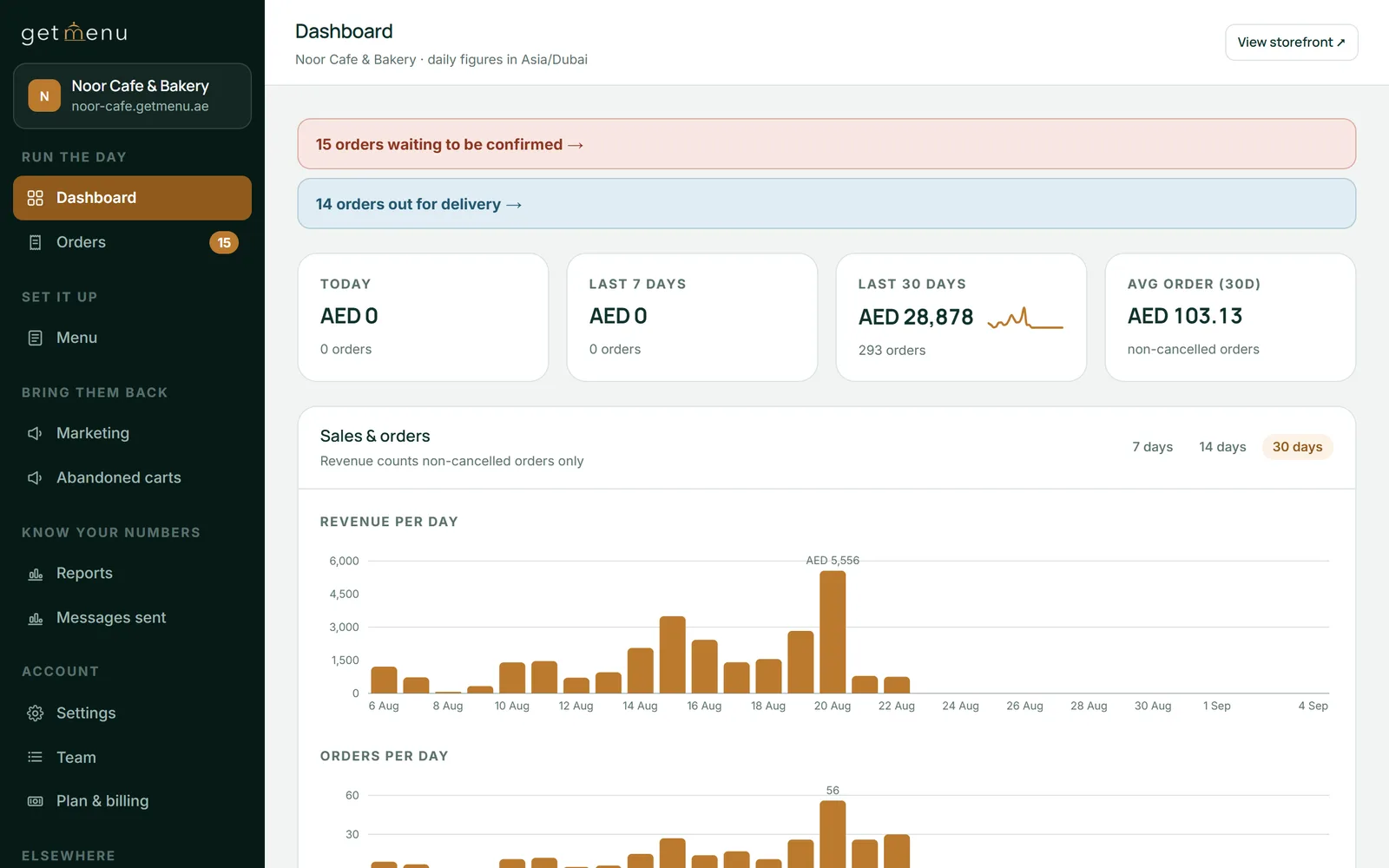
The Noor Cafe & Bakery dashboard: orders waiting to be confirmed, orders out for delivery, and sales for today, the last 7 days and the last 30 days
Frequently asked questions
Is Clover POS worth it for a restaurant?
For a counter-led restaurant in one of Clover's countries that wants hardware and payments from one supplier, yes: reviewers praise the range of hardware and the all-in-one setup, and online ordering comes without commission. The costs to weigh are the processing on every card, the apps you will need for loyalty and the rest, and the contract term. For a delivery-led kitchen with its own riders, the fit is weaker.
Does Clover charge for online ordering and loyalty apps?
Online ordering is included, with no setup fee and no commission, according to the reviews. Loyalty is an app from the App Market, and one pricing breakdown puts loyalty apps at $25 to $70 a month and scheduling apps at around $10 to $30, each its own subscription. So the counter and the ordering page are in the plan, and the extras are bought one by one.
Not in the UAE: Clover's own developer page does not list it. In the UK, yes, sold only through bank resellers, with card processing locked to Fiserv. The page lists the United States, Canada, Argentina, Brazil, Mexico, Australia, Singapore, the United Kingdom, Ireland, Austria, Germany and the Netherlands. A restaurant outside Clover's countries needs a system that is sold and billed in its own country.
Is Clover right for my business?
If your sales happen at the counter and you want one bill for the device and the card payments, probably. If your sales arrive from a link and leave with riders, if you want to be free to change your card processor, or if you want loyalty and messages included rather than bought as apps, probably not. Write down a normal month both ways, processing and apps included, and the answer is usually clear.
How much does Clover cost per month for a restaurant?
One breakdown lists the restaurant software at $89.95 a month for Full-Service Dining Starter, $109.90 for Standard and $129.85 for Advanced, with hardware bundles from $1,799, plus processing at 2.3% plus 10 cents in person and any apps you add. The reseller's contract sets the term. Ask for the all-in figure for one normal month before comparing it with a flat plan.
Can I keep my Clover hardware if I switch?
Clover's hardware is proprietary and is tied to the processor that set it up, so it does not run other POS systems. GetMenu runs on an iPad or iPhone on iOS 16 or later and on Android phones, tablets and POS terminals you buy anywhere, paired with a six-character code. It prints to ordinary ESC/POS or Star receipt and kitchen printers. The cash drawer opens through the receipt printer, as before.
One system, four jobs: the counter, the tables, the kitchen and the online orders, with no commission on any of them. What a UK restaurant should ask of its EPOS, in UK terms, and what it should cost.
Square is a good first POS for a cafe or a food truck. It is time to move when your riders work from WhatsApp, the card bill grows with every sale, a third site opens, or stock must be counted per add-on.