Home/Blog/Restaurant printers: choosing receipt and kitchen printers
Restaurant printers: choosing receipt and kitchen printers
The printer in a hot kitchen that keeps working is the one on a cable. Here is how to choose receipt, kitchen and built-in printers, and how one order prints at the counter and in the kitchen.
Anzul Aqeel · Founder & Director, Anunzio International FZC · 7 October 2026 · updated 16 October 2026
In a hot, greasy kitchen, the restaurant printers that keep working are the ones on a network cable. Bluetooth belongs at the counter, a metre from the screen. The GetMenu POS prints the customer's receipt at the counter and a kitchen ticket at each station, on USB (on the LAN), network, Bluetooth and built-in printers.
Which restaurant printers survive a hot kitchen: LAN beats Bluetooth
A kitchen printer on an Ethernet cable keeps printing when the room is full, because a cable does not care about walls, steel shelving or forty phones on the Wi-Fi. A Bluetooth printer in the same spot drops out exactly when the orders pile up.
So the rule is simple. Wire the kitchen printer to the network. Use Bluetooth or a built-in printer at the counter, where the tablet and the printer sit together and a dropped connection is noticed at once. A USB printer on the LAN works in either place.
Restaurant kitchen printers: thermal or impact, 58 mm or 80 mm
Restaurant kitchen printers come in two kinds. A thermal printer burns the image onto heat-sensitive paper, with no ink and no ribbon, so it is fast, quiet and cheap to run. An impact printer strikes a ribbon onto plain paper. It is slower and louder, but the ticket does not darken when the kitchen gets hot.
Put thermal printers at the counter, the drinks station and the pass (the window where finished plates go out). Put an impact printer by the grill or fryer, because thermal paper turns black in heat and a ticket that has turned black cannot be read. Epson sells its TM-T88VII thermal printer, which prints at up to 500 mm per second, for fast counter printing. It sells its TM-U220 impact printer as a receipt and kitchen printer. It prints on plain paper with a ribbon, at up to 6.0 lines per second.
Paper width is the other choice. An 80 mm roll gives 48 characters per line, which is what kitchen tickets and counter receipts need. A 58 mm roll gives 32 characters and suits handheld machines and delivery receipts. One paper guide puts an 80 mm by 80 mm roll at about 60 to 80 metres of paper. Paper is not going away either: IMARC puts the thermal paper market at USD 5.0 billion in 2026, up from USD 4.7 billion in 2025, and growing about 4.2% a year to 2034. The GetMenu POS formats the ticket for either width.
Epson restaurant printers and what ESC/POS means
Epson restaurant printers are the common choice because Epson wrote ESC/POS, the printer language that most receipt printers use. A printer that uses ESC/POS works with a POS that sends ESC/POS, whoever made either of them.
The GetMenu POS sends every receipt and kitchen ticket in ESC/POS. Choose a printer that lists ESC/POS. Most do, and Star printers work too, as do the built-in printers on Sunmi machines. Avoid a printer that only works through one vendor's cloud, because it stops working the day you change software.
Anzul Aqeel, the founder of GetMenu, spent four years reselling POS management software to small businesses before he built GetMenu. "A printer on a cable is the one nobody thinks about during service. That is why we tell every kitchen to wire its printer and keep Bluetooth at the counter."
How one order prints at the counter and in the kitchen
The counter printer prints the customer's receipt, and each kitchen station prints its own ticket from the same order. In the dashboard you create stations such as Grill, Fryer and Drinks, and set each dish to the station that cooks it.
When the order is placed, the GetMenu POS splits it. The grill printer gets the grill dishes, the drinks printer gets the drinks, and every ticket carries the same order number in large type and no prices. A customer's choices, such as no onions or extra cheese, are printed in bold on the kitchen ticket. The customer's note prints on the ticket too, and a note about an allergy prints in bold red above the dishes. The counter receipt carries your closing line, a QR code to your ordering page, and a VAT line once you add your tax number.
Every order is on one kitchen ticket: counter, web and WhatsApp. An order from your ordering page or from WhatsApp shows on the POS screen beside the counter sales, and each station's printer prints its ticket, the same as for a counter sale. The managers' WhatsApp group gets its ticket the moment the order is placed.
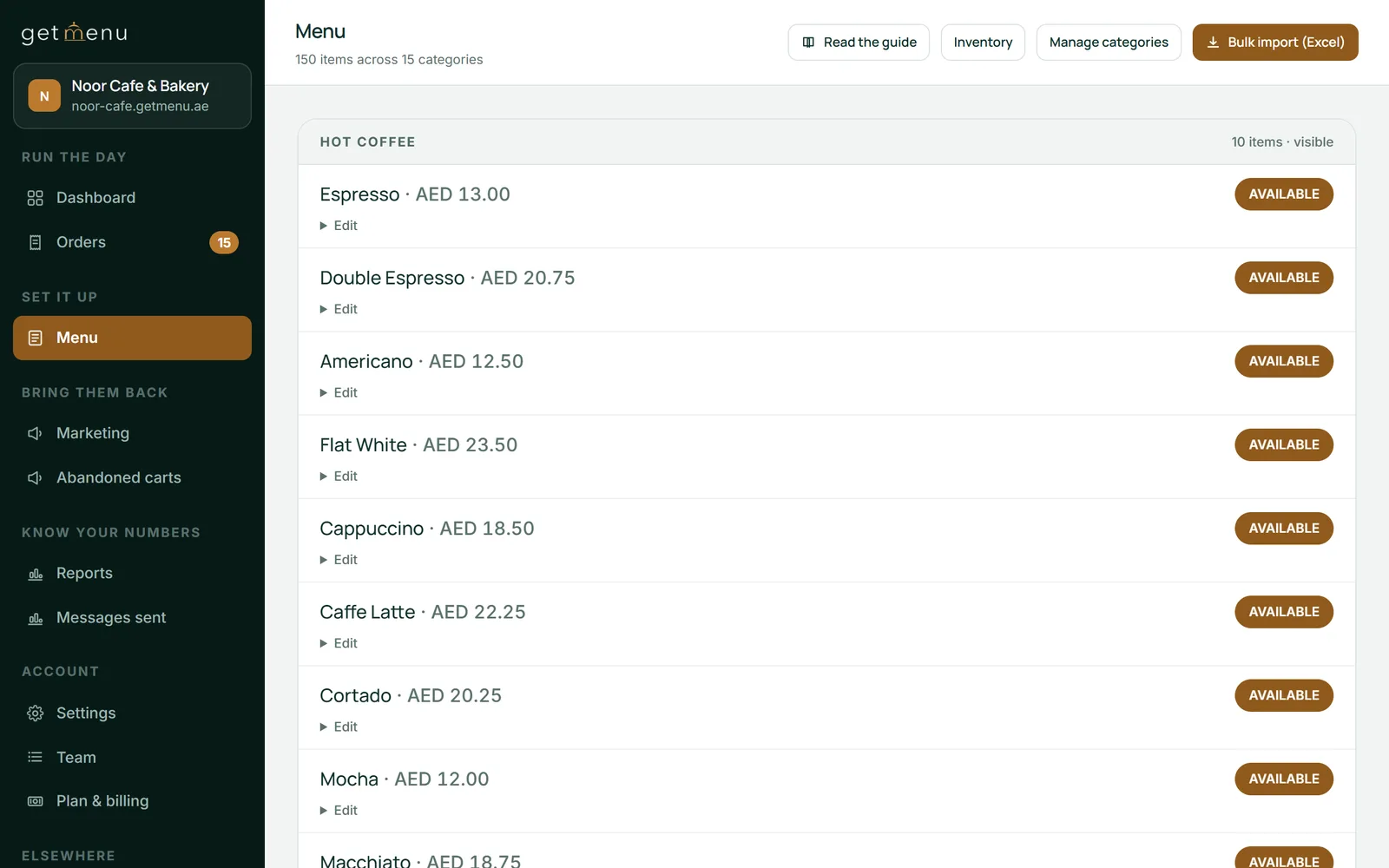
The menu list in the dashboard: 150 items across 15 categories, the dishes that each kitchen ticket is built from
The cash drawer port and the built-in printer
The cash drawer plugs into the receipt printer, not into the tablet. Most receipt printers have a small drawer port, and the drawer's cable goes into it. When a cash sale is completed, the printer sends an electrical pulse and the drawer pops open.
In the GetMenu POS you tick which ways of paying open the drawer, so a card sale leaves it shut and a waiter's phone never opens it. On a Sunmi terminal the drawer pulse comes from the machine itself, because the printer is built in. Those built-in printers, on Sunmi and iMin machines, take 58 mm or 80 mm paper depending on the model, and need nothing plugged in. That is why a food truck or a kiosk often runs on one machine and no separate printer.
One more detail for Arabic menus: on Android the receipt is drawn as a picture, so right-to-left text and Arabic dish names print correctly on any ESC/POS printer.
A printer plan for a small restaurant
Buy one thermal receipt printer for the counter, on the network or built into the machine, and one printer for the kitchen on an Ethernet cable, impact if it sits beside the grill. That is enough for most small restaurants, and a second kitchen printer is added only when one station cannot keep up.
Before each shift the GetMenu POS checks that the network printers answer, so a printer that was unplugged overnight is found before the first order, not during it. With no printer at all, the receipt shows on the screen and can be sent to the customer's WhatsApp. If you would rather not print in the kitchen, pair an older tablet as a kitchen screen. Every order shows with its time in colour: green when the order arrives, amber when it is nearly late, red when it is late.
The rest of the system keeps those tickets right. Upload the whole menu from a spreadsheet instead of typing it, then set each dish to its station. One stock list for the counter and the online menu: counts fall as orders come in from both, and when a dish is marked None left on a POS, it also goes off the other POS devices and the online menu, so no ticket prints for a dish you cannot make. A delivery order sends a dispatch to the riders' group with the building picked and the unit number typed at checkout. On Pro, regulars grow into loyalty tiers. On Growth and Pro, a customer who types a name and number at checkout and leaves without ordering gets a reminder from you. The POS is a yearly add-on on top of your plan, priced in your currency on the pricing page. The ordering platform's trial runs 15 days and needs no card.
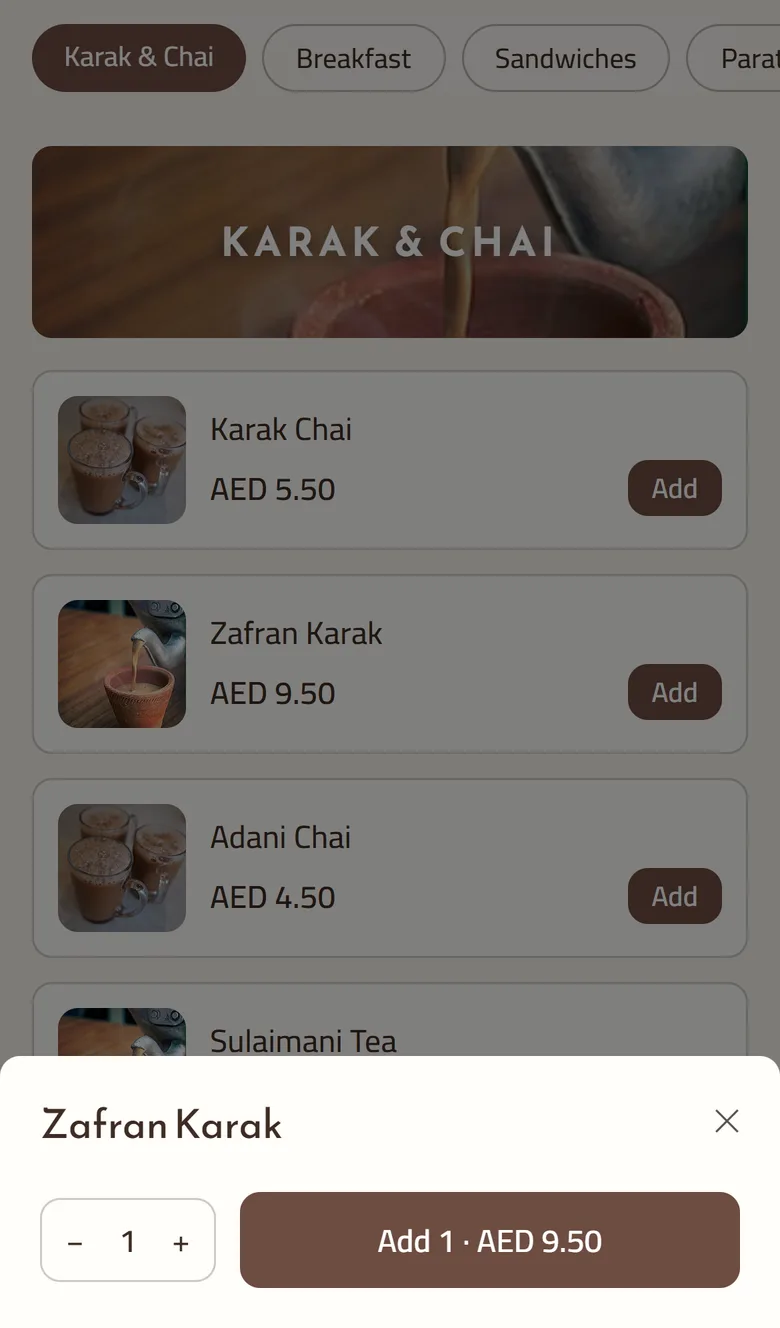
The dish sheet a customer sees for Zafran Karak: a quantity stepper and an Add button. When a dish has choices, they appear here and print in bold on the kitchen ticket
Frequently asked questions
Kitchen printer vs receipt printer: what's the difference?
A receipt printer sits at the counter and prints the customer's bill with prices, your closing line and a QR code to your ordering page. A kitchen printer sits at a station and prints a ticket with the order number in large type, the dishes for that station, the customer's choices and note, with no prices. The GetMenu POS prints both from the same order.
Thermal or impact: how do I choose the best printer for my restaurant?
Choose thermal for the counter and the drinks station: it is fast, quiet and needs no ribbon. Choose impact for a station beside the grill or fryer, because thermal paper darkens in heat and an impact ticket on plain paper stays readable. Most printers of both kinds use ESC/POS, so the GetMenu POS prints to either without any change in setup.
Do I need a kitchen printer at every station?
Only at the stations where cooks work from paper. The GetMenu POS prints each station's dishes on that station's own ticket, so the grill printer gets the grill dishes and the drinks printer the drinks, with counter, web and WhatsApp orders on the same ticket. A station that reads a kitchen screen needs no printer. Our guide to kitchen screens and paper tickets compares the two.
Why does my Bluetooth printer disconnect?
Usually because it went to sleep, the tablet's battery saver closed the POS app, or the radio channel got crowded by Wi-Fi and microwave ovens. Most Bluetooth is rated for about 10 metres in open air and far less through steel and walls. Keep Bluetooth printers at the counter next to the tablet, and put the kitchen printer on a network cable.
How do I connect a cash drawer to a receipt printer?
Plug the drawer's cable into the drawer port on the back of the receipt printer, then tell the POS which ways of paying should open the drawer. When a cash sale is completed the printer sends a pulse and the drawer opens; a card sale leaves it shut. On a Sunmi machine the pulse comes from the terminal itself, because its printer is built in.
80mm vs 58mm receipt paper: which should I use?
Use 80 mm paper at the counter and in the kitchen: it gives 48 characters per line, so dish names and choices fit without wrapping. Use 58 mm paper on handheld machines and for delivery receipts, where 32 characters per line is enough and the smaller roll fits the device. The GetMenu POS formats receipts and tickets for both widths.
Refurbished tablets are a safe buy for a restaurant POS. Refurbished vendor terminals usually are not, because the software stays with the first owner. Here is how to build from parts.
A restaurant in Lagos or Abuja weighing up eZee BurrP is really weighing up two decisions at once: what the software does, and what owning the computer it runs on will mean.